

Raspberry Pi 運用・管理
Raspberry Pi OS
Webサーバーの OSを Bookworm から Trixieへのアップグレード
Raspberry Pi OS
Webサーバーの OSを Bookworm から Trixieへのアップグレード
現在稼働している Webサーバーは、Raspberry Pi OS が 【Bookworm】 で、この上で稼働しているサーバーソフトは【nginx + php + WordPress】の構成になっている。このWebサーバーの環境を保持したまま、OSのみを Bookworm から Trixie にアップグレードし、問題なく稼働するかテストを試みた。
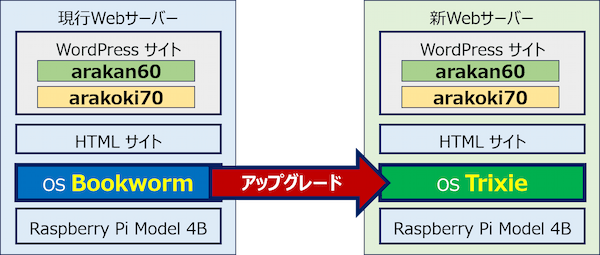
以下、正常に稼働したので、実行したアップグレード手順を記録。
スポンサー リンク
目 次
1. アップグレード要領
Webサーバーのソフト構成。

🔄 Raspberry Pi OS Bookworm から Trixie(Debian 13)へのアップグレードは、パッケージリストの記述を bookworm から trixieに書き換え、【apt update】と【apt full-upgrade】を実行するだけで実施できる。
⚠️ 作業前には必ずバックアップを作成し、不測の事態に備える。
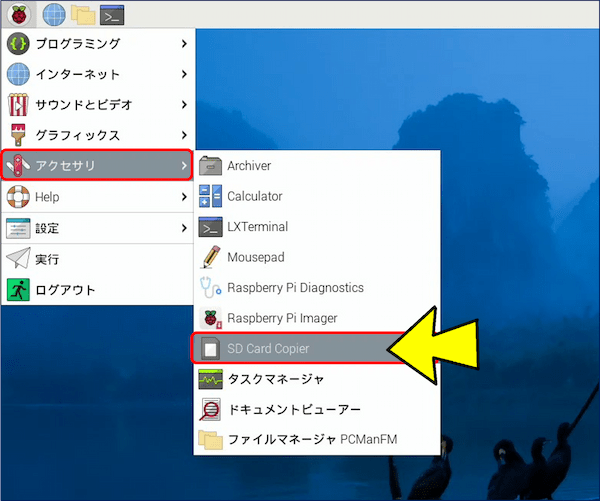
バックアップは、「SD Card Copier」でクローンを作成する。
メニューから「アクセサリ」を選択し、「SD Card Copier」を立ち上げる。
メニューから「アクセサリ」を選択し、「SD Card Copier」を立ち上げる。
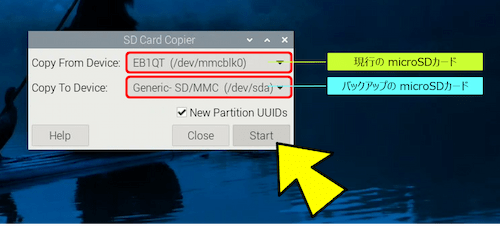
Copy From Device(コピー元)に【/dev/mmcblk0】を選択し、Copy To Device(コピー先)に【/dev/sda】を選択して、且つ、「New Partition UUIDs」にチェックを入れて「Start」をクリックする。
🧰 また、現行のバージョンを確認しておき、アップグレード後のバージョンとを突合せ、確認すると良い。
🔹 Raspberry Pi OSの現行バージョン。

🔹 サーバーソフトの現行バージョン。

2. リポジトリの書き換え要領
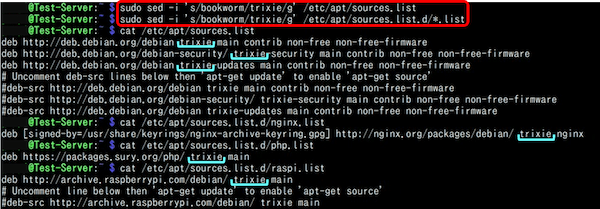
✅ sed コマンドを用いて、リポジトリを (Bookworm -> Trixie)に書き換えることが出来る。
sudo sed -i 's/bookworm/trixie/g' /etc/apt/sources.list
sudo sed -i 's/bookworm/trixie/g' /etc/apt/sources.list.d/*.list
sudo sed -i 's/bookworm/trixie/g' /etc/apt/sources.list
sudo sed -i 's/bookworm/trixie/g' /etc/apt/sources.list.d/*.list
🧰 sed コマンドとは:
テキストデータを1行ずつ読み込み、正規表現を用いて置換、削除、挿入などを効率的に行うコマンド。
🔹 文字列の置換: sed 's/旧/新/g' file (gは全置換)。
🔹 ファイルの上書き: sed -i 's/old/new/g' file。
テキストデータを1行ずつ読み込み、正規表現を用いて置換、削除、挿入などを効率的に行うコマンド。
🔹 文字列の置換: sed 's/旧/新/g' file (gは全置換)。
🔹 ファイルの上書き: sed -i 's/old/new/g' file。
🔄 sed コマンドの実行前と実行後。
# コマンド実行前の sources.list:
deb http://deb.debian.org/debian bookworm main contrib non-free non-free-firmware
deb http://deb.debian.org/debian-security/ bookworm-security main contrib non-free non-free-firmware
deb http://deb.debian.org/debian bookworm-updates main contrib non-free non-free-firmware

# コマンド実行後の sources.list:
deb http://deb.debian.org/debian trixie main contrib non-free non-free-firmware
deb http://deb.debian.org/debian-security/ trixie-security main contrib non-free non-free-firmware
deb http://deb.debian.org/debian trixie-updates main contrib non-free non-free-firmware
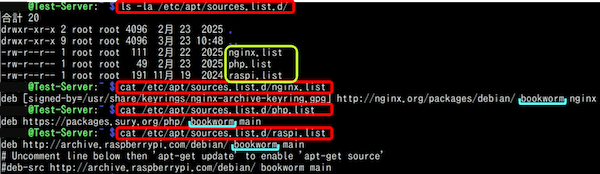
🔎 リポジトリの場所と内容。
🔹ls -la /etc/apt/sources.list # debian APTのリポジトリ
-rw-r--r-- 1 root root 642 11月 19  2024 /etc/apt/sources.list

🔸cat /etc/apt/sources.list # debian APTのリポジトリの内容
deb http://deb.debian.org/debian bookworm main contrib non-free non-free-firmware
deb http://deb.debian.org/debian-security/ bookworm-security main contrib non-free non-free-firmware
deb http://deb.debian.org/debian bookworm-updates main contrib non-free non-free-firmware
# Uncomment deb-src lines below then 'apt-get update' to enable 'apt-get source'
#deb-src http://deb.debian.org/debian bookworm main contrib non-free non-free-firmware
#deb-src http://deb.debian.org/debian-security/ bookworm-security main contrib non-free non-free-firmware
#deb-src http://deb.debian.org/debian bookworm-updates main contrib non-free non-free-firmware

🔹ls -la /etc/apt/sources.list.d/ # 外部ソフトを追加するときのリポジトリ
-rw-r--r-- 1 root root  111  2月 22  2025 nginx.list
-rw-r--r-- 1 root root   49  2月 23  2025 php.list
-rw-r--r-- 1 root root  191 11月 19  2024 raspi.list

🔸cat /etc/apt/sources.list.d/nginx.list # nginx用のリポジトリ
deb [signed-by=/usr/share/keyrings/nginx-archive-keyring.gpg] http://nginx.org/packages/debian/ bookworm nginx

🔸cat /etc/apt/sources.list.d/php.list # php用のリポジトリ
deb https://packages.sury.org/php/ bookworm main

🔸cat /etc/apt/sources.list.d/raspi.list # raspi用のリポジトリ
deb http://archive.raspberrypi.com/debian/ bookworm main
# Uncomment line below then 'apt-get update' to enable 'apt-get source'
#deb-src http://archive.raspberrypi.com/debian/ bookworm main
書き換え前の debian APTのリポジトリ。

書き換え前の 外部ソフトのリポジトリ。
リポジトリを (Bookworm -> Trixie)に書き換えた結果。
3. アップグレード手順
実行したアップグレード手順。
🔹 バックアップ

「アクセサリ」にある「SD Card Copier」で、クローンを作成しておく。

🔹 現行バージョンの確認
OSのバージョンを確認
lsb_release -a

カーネルのバージョンを確認
uname -a

各アプリのバージョンを確認
nginx -v
php -v
mysql --version

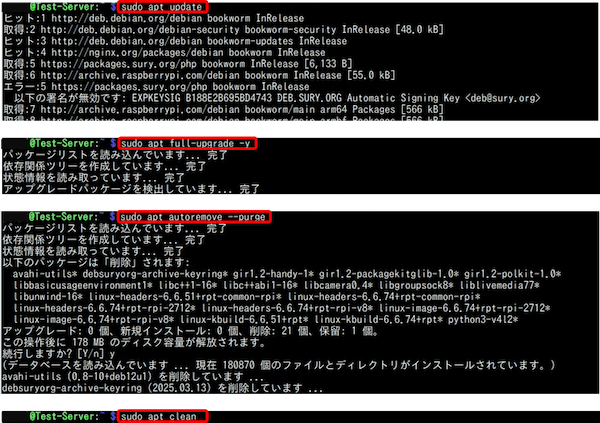
🔹 Bookwormを最新の状態にする
sudo apt update
sudo apt full-upgrade -y
sudo apt autoremove --purge
sudo apt clean

🔹 リポジトリの書き換え (Bookworm -> Trixie)
sudo sed -i 's/bookworm/trixie/g' /etc/apt/sources.list
sudo sed -i 's/bookworm/trixie/g' /etc/apt/sources.list.d/*.list

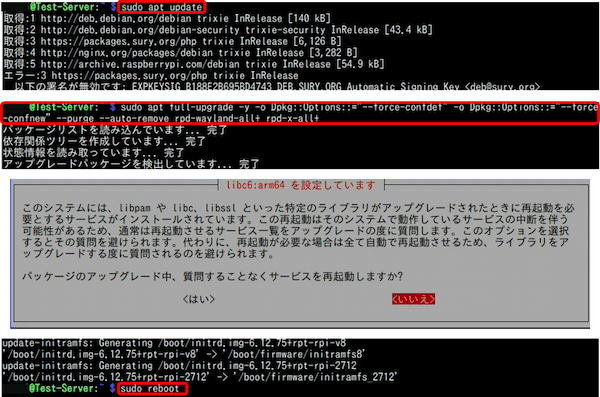
🔹 アップグレードの実行
sudo apt update
sudo apt full-upgrade -y -o Dpkg::Options::="--force-confdef" -o Dpkg::Options::="--force-confnew" --purge --auto-remove rpd-wayland-all+ rpd-x-all+

🔹 再起動
sudo reboot

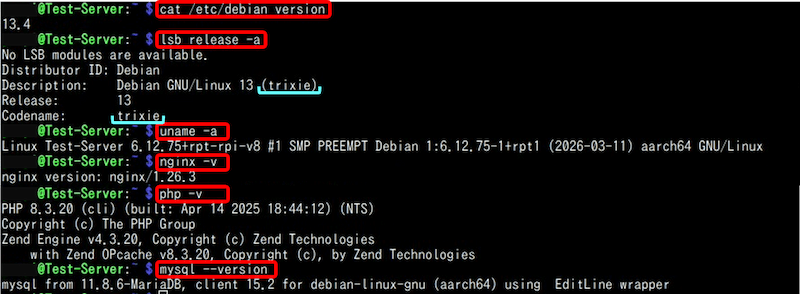
🔹 アップデート後のバージョンを確認
lsb_release -a
uname -a
nginx -v
php -v
mysql --version
✅ 既存システムの最新化。
✅ リポジトリの書き換え (Bookworm -> Trixie)。

✅ パッケージリストの更新とアップグレード。
✅ アップデート後のバージョン。
以上。
(2026.03.23)
(2026.03.23)
スポンサー リンク